Amazon Just Launched New Kindles for 2026 — Here’s EVERYTHING You Need to Know
This post may contain affiliate links. As an Amazon Associate and Bookshop.org affiliate, I earn from qualifying purchases at no extra cost to you.
Table of Content
Amazon has done it again! Just when you thought your current Kindle was perfectly happy sitting on your nightstand, Amazon has launched a whole new Kindle lineup for 2026.
And the timing is… interesting. Because Amazon’s Prime Big Deal Days are happening right now, and some previous-generation Kindle models are being discounted while these shiny new ones are arriving. Amazon says most of the deals would be running for 48 hours, with new deals dropping throughout the event, which means you now have a slightly annoying but very useful decision to make:
Do you buy one of the brand-new Kindles, or grab an older model while it’s on sale?
And if you already own a Kindle, there’s an even bigger question:
Do you actually need to upgrade?
That’s what we’re going to figure out.
A quick note before we get into it: I haven’t personally tested the new 2026 Kindles yet, so this isn’t a hands-on review. I went through Amazon’s launch information, specifications and early coverage to figure out what has actually changed and, more importantly, what those changes mean for readers. I’m not going to pretend I spent three weeks reading under a blanket with one when I didn’t.
Because you don’t need another article telling you a product is “amazing” five minutes after it launches. You need to know whether it’s worth your money. And right now, with older Kindles on sale too, that question is more interesting than ever.
First: Should You Buy the New Kindle or an Older Kindle on Sale?
Before we get into all the shiny new features, let’s talk about the elephant in the room. The older Kindles are suddenly much more tempting.
During Prime Big Deal Days, Amazon is discounting Kindle devices, including previous-generation models, while the new lineup is arriving. The exact prices can change throughout the event, so I’d check the current deal before buying rather than relying on a screenshot from a few hours ago.
And this is where I think having a little patience can save you money. If you’ve been eyeing one of the Kindles I’ve already reviewed and the older model is now significantly cheaper, don’t automatically assume the new version is the better deal.
A previous-generation Paperwhite, for example, can still be a fantastic e-reader. You may simply be giving up some of the new design changes and newer hardware. So throughout this guide, I’ll tell you where I think the new Kindle is actually worth paying for and where I’d happily save the money.
Because Amazon would love for us to believe that “new” automatically means “necessary” but I am not entirely convinced.
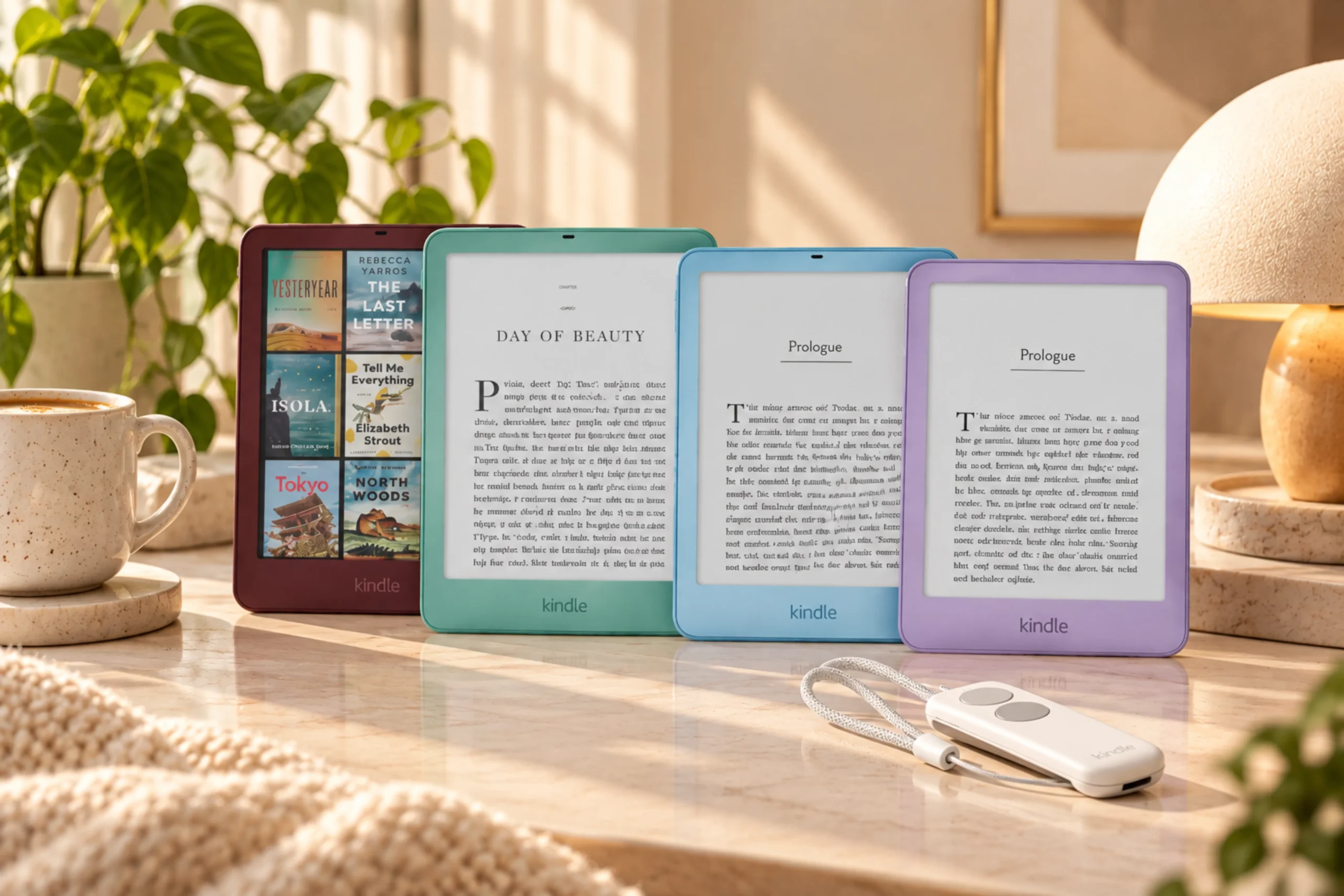
Meet the New Kindle Family
Amazon has refreshed three main Kindle lines:
Kindle Basic — the small, straightforward option
Kindle Paperwhite — the all-rounder
Kindle Colorsoft — the color option
There are also Signature Editions, Kids models and some surprisingly interesting accessories. Here’s the quick comparison:
| Kindle model | Display | Storage | Waterproof | Starting price | Colors |
|---|---|---|---|---|---|
| Kindle | 6-inch | 16GB | No | $149.99 | Ube, Graphite |
| Kindle Aluminum | 6-inch | 32GB | No | $189.99 | Alpine Sky, Seaglass Green |
| Kindle Paperwhite | 7-inch | 16GB | Yes | $199.99 | Graphite |
| Paperwhite Signature Edition | 7-inch | 32GB | Yes | $249.99 | Graphite, Seaglass Green |
| Kindle Colorsoft | 7-inch | 16GB | No | $289.99 | Graphite |
| Colorsoft Signature Edition | 7-inch | 32GB | Yes | $319.99 | Graphite, Fig |
These are Amazon’s U.S. launch prices, so prices and availability can vary by market. Now let’s talk about what actually changed.
What’s New About the 2026 Kindles?
The first thing you’ll notice is the flush-front display. The older Kindle Basic design had a recessed screen surrounded by a raised bezel. Amazon’s new models use a flush-front design, giving the devices a more seamless appearance. Amazon says the new display architecture also contributes to the thinner and lighter redesign and improves contrast and clarity.
Across the new Kindle family, we’re also getting:
- New colors
- Thinner and lighter bodies
- Aluminum versions
- USB-C
- Replaceable batteries
- Updated display technology
- New premium accessories
- More options for color reading
And here’s the distinction I want you to keep in mind: Some of these are meaningful upgrades. Some are luxuries. So let’s not buy anything until we figure out which is which.
The New Kindle: Small, Simple and Easy to Love
Let’s start with the cheapest model.
The new Kindle Basic model has a 6-inch, 300 ppi glare-free display, 16GB of storage, USB-C charging and up to six weeks of battery life at only $169.99. Amazon also says it opens books 30% faster than the previous generation. It’s also incredibly light.
The standard model weighs around 140g and is approximately 6.8mm thick. And honestly, this is still the biggest reason I like the idea of a Basic Kindle. It isn’t trying to become a tablet or replace your laptop. It is a little reading machine you can throw into your bag and forget about until you’re ready to read.
That’s exactly what I want an e-reader to be. The new Kindle also comes in gorgeous colors. The standard model comes in Ube and Graphite, while the aluminum version offers additional finishes.
The Aluminum Kindle: Is It Actually Better?
Okay, this is where I started asking the questions because it is almost same as the Ube version but you have to pay $189.99. Yes, it is aluminum and it comes without ads, but then…I know some of you are probably asking too. Aluminum sounds fancy. But isn’t it more prone to scratches and dents?
Potentially, yes.
Amazon is using 80% recycled aluminum with a matte finish for the aluminum Kindle. It certainly gives the device a more premium feel, but premium material doesn’t mean indestructible material.
Aluminum can still scratch, and a hard drop onto an edge can potentially dent it. Since this is a brand-new model, we also don’t have years of real-world durability testing to tell us exactly how the finish will look after months of being carried around.
So if your Kindle usually lives loose in a bag with your keys, charger, lip balm, receipts and the rest of your life, I’d still get a case. But here’s the reassuring part: The aluminum version isn’t dramatically heavier.
The standard Kindle is around 140g, while the aluminum version is approximately 147g. That’s only about seven grams more. So I wouldn’t make weight the deciding factor. Instead, ask yourself: Do I want the aluminum finish badly enough to pay extra for it?
If yes, great. If you’re paying extra because you think aluminum will make your Kindle practically indestructible, I’d save the money. It’s still an e-reader, not a brick! And another important thing is that it comes without ads, so if that’s something you prefer, this could be your dream device. And yes, it comes in beautiful Alpine Sky and Seaglass Green colors.
Do You Actually Need 32GB?
This is one of those specifications that looks more important than it probably is. If you mostly read novels, 16GB is already a lot of storage.
E-books are tiny compared with movies, games and other large files, so the average fiction reader can keep a very substantial library on a 16GB Kindle.
So don’t pay extra simply because: But I read a LOT.
I believe you. But your TBR pile isn’t going to physically break through the Kindle’s storage limit tomorrow.
If you read audiobooks, comics, graphic novels or other larger files, additional storage becomes more useful. For someone downloading mostly novels? I’d put the money toward books instead.
Kindle Paperwhite: The Sweet Spot?
Now we’re getting somewhere.
The 2026 Kindle Paperwhite has a 7-inch display, 16GB of storage, waterproofing, adjustable warm light and up to 12 weeks of battery life. Amazon also says its redesigned display architecture delivers the highest contrast ratio yet for crisp, clear text.
And if someone asked me: Okay, I want a Kindle. Which one should I buy? This is where I’d start. Not because it’s the fanciest. Because these are the features you’re actually going to notice if you read regularly:
- Larger 7-inch screen
- Waterproofing
- Warm light
- 16GB storage
- Up to 12 weeks of battery life
- New flush-front design
- Thinner and lighter body
The Paperwhite starts at $199.99, just $50 more than the Basic Kindle at launch. And honestly? If you read every day, that’s a pretty reasonable upgrade. If you mostly read novels at home and don’t need waterproofing or warm light, the Basic Kindle still gets you surprisingly close to the core reading experience for less.
Kindle vs. Paperwhite: Which One Makes More Sense?
Let’s make this simple.
First, there’s one thing you don’t lose by choosing the Basic Kindle: the core E-Ink reading experience. Both use E-Ink, so both give you that paper-like, distraction-free screen rather than a bright phone or tablet display. The real differences are everything around it.
Go for the Kindle Basic if…
You want the most budget-friendly option, mainly read novels, care about portability and don’t need waterproofing or warm lighting.
Go for the Paperwhite if…
You read frequently, want a larger 7-inch screen, like reading at night, want warm lighting or regularly read around water.
For most everyday readers, Paperwhite looks like the sweet spot—but the Basic Kindle isn’t a huge downgrade. You’re mostly deciding how many extra conveniences you want to pay for.
Paperwhite Signature Edition: What Are You Paying For?
The Kindle Paperwhite Signature Edition starts at $249.99. It adds:
- 32GB storage
- Aluminum rear housing
- Auto-adjusting front light
- Pogo-pin dock charging
- Double-tap page turning
Here’s the question I’d ask before spending the extra $50: Will I actually use those features?
If you simply want a really good Kindle for reading novels, the regular Paperwhite is probably enough. If you like premium hardware and want automatic lighting and dock charging, Signature becomes more appealing. So:
Paperwhite = best value.
Paperwhite Signature = premium convenience.
And I wouldn’t buy the Signature solely because it has 32GB. I would rather choose the basic model, it’s prettier too!
Kindle Colorsoft: Finally, Color
Now we get to the Kindle that is probably going to make the biggest splash. The Kindle Colorsoft has a 7-inch color display, 16GB of storage and waterproofing. It starts at $289.99.
Amazon says the new Colorsoft display is designed to provide a paper-like color experience while improving brightness and color performance. Now, I’m not going to tell you the colors are beautiful or gorgeous because… I haven’t personally tested it. And I think being honest about that matters.
But we can still answer the question that actually matters: Do you need a color Kindle?
If you mostly read novels? Probably not.
Your thriller isn’t going to become more thrilling because the cover is in color. But Colorsoft makes much more sense if you read:
- Graphic novels
- Comics
- Illustrated books
- Cookbooks
- Travel guides
- Art books
- Children’s books
- Color-heavy nonfiction
In those cases, color isn’t just a gimmick. It can actually contribute to the reading experience. The catch? Price. At $289.99, Colorsoft is $90 more than the Paperwhite. So if you’re thinking: Color sounds cool. I’d probably save the money.
If you’re thinking: I actually read books where color matters. That’s a different conversation then! You may go ahead and get it but there are better color e-reader options, so make sure to check that out!
Colorsoft Signature Edition: The Premium Color Kindle
The Colorsoft Signature Edition starts at $319.99 and adds:
- 32GB storage
- Aluminum housing
- Auto-adjusting front light
- Pogo-pin dock charging
- Double-tap page turning
At this point, we’re firmly in premium Kindle territory. You’re not buying this because you need an e-reader. You’re buying it because you want the nicest version of the e-reader. And that’s okay. Just don’t confuse “most expensive” with “best for every reader.” This is the one you buy on a whim because you’ve probably been partying all night and temporarily lost your financial judgment. Unless you really want the premium extras or fig is the color of your dreams, your bank account will probably survive just fine without it.
But then, sometimes a reader needs a little bad decision to make their fictionally ruined life a bit fancier! You know, the aesthetically appealing tragedy is what I would call this e-reader!
And Now We Have Kindle-Click!
Okay, I’ll admit it: I don’t use a Kindle remote myself. But I’ve never been a huge fan of the older page-turning remotes that required you to physically attach a little gadget to the side of the Kindle screen. It always felt like one more thing stuck onto an otherwise beautifully simple device.
The new Kindle Click takes a much cleaner approach. It’s a small Bluetooth remote that lets you turn pages and control brightness without attaching anything to the Kindle itself.
And honestly? That’s a pretty big game changer if you’re someone who actually wants a remote. Think reading in bed with your Kindle propped up, reading on a stand while you’re cooking, or keeping your hands comfortably under the blanket while you turn pages. You get the convenience without having to clamp anything onto the screen.
It costs $34.99, and it works with the new 2026 Kindles as well as compatible Kindle models from 2024 onward.
Do you need it? Absolutely not. Your finger remains a remarkably affordable piece of technology. But if you’ve wanted a Kindle remote and hated the awkwardness of the older attach-to-the-device designs, this is probably the Kindle Click’s biggest selling point.
The Page-Turn Cover Is Actually Pretty Clever
Amazon also launched a $79.99 Page-Turn Cover with physical page-turn buttons for the Paperwhite Signature Edition and Colorsoft Signature Edition.
And I actually find this one easier to justify. You get: A protective cover + physical page controls.
If you’re already planning to buy a case and genuinely want buttons, it could make sense. If you don’t care about physical controls? A regular case is perfectly fine. This is the least exciting launch for me, but I can see why it might work for some people. The older Kindle devices had buttons but that would make them way too wide for a comfortable read. This cover is sleek and magnetic, which is kinda cool.
What About the New Charging Dock?
The premium Signature models can also use Amazon’s new charging dock, priced at $59.99. It keeps the Kindle upright while charging.
Useful? Yes.
Essential? Not remotely.
If you love having a dedicated place for your Kindle, you’ll probably enjoy it. If your Kindle spends most of its time in your handbag, I’d put the $60 toward something else.
Like books. Obviously! This one is all fancy shmancy but not necessary. Also, it is not yet listed on Amazon.
One Quiet Upgrade I Actually Like: Replaceable Batteries
This isn’t the flashy feature everyone will be talking about, but I think it’s important.
Amazon’s new Kindle models have user-replaceable batteries, giving the devices a better chance of staying useful for longer instead of becoming disposable when the battery eventually wears down.
And I really like this direction. A Kindle doesn’t need to be replaced every couple of years because it suddenly can’t run the latest app. It’s an e-reader. If the screen still works and you still love reading on it, why shouldn’t the device have a longer life?
One caveat: user-replaceable doesn’t mean you should necessarily grab a screwdriver and start operating on your Kindle at home. Follow Amazon’s battery replacement and service guidance.
But the basic idea is excellent. A Kindle should last.
What About the New Kindle Kids Models?
Amazon is also refreshing its Kids lineup with Kids versions of the Kindle, Paperwhite and Colorsoft.
These include kid-focused covers and 12 months of Amazon Kids+, which provides access to children’s books and audiobooks. These variants were not really hyped up during the launch, and I can see why! Amazon already has these variants from 2024, and Prime Day Deals are offering pretty good discounts on all of them.
Still, if you’re buying an e-reader for a child, that’s worth considering because you’re not just buying the hardware. You’re also getting the children’s reading ecosystem. And honestly, anything that encourages a child to pick up a book instead of endlessly scrolling deserves some credit.
So, Which New Kindle Should You Buy?
Okay, here’s my cheat sheet.
🥇 Best for most readers: Kindle Paperwhite
If you read regularly and want the best balance of features and price, Paperwhite is the one I’d look at first. The 7-inch display, waterproofing, warm light and long battery life make it a very sensible everyday Kindle.
💰 Best budget option: Kindle
If you want something small, lightweight and straightforward, go for the new Kindle. Especially if you mostly read novels. This is something I would choose myself!
🎨 Best for color reading: Colorsoft
If you read comics, graphic novels, illustrated books, cookbooks or other visually rich material, Colorsoft is an interesting choice.
✨ Best premium Paperwhite: Signature Edition
If you want automatic lighting, premium materials, dock charging and more storage, Signature is the upgraded experience.
👑 Most premium: Colorsoft Signature
If you want color plus all the premium extras and don’t mind spending over $300, this is the top of the current lineup.
Should You Upgrade Your Current Kindle?
This is the question I’d ask before you buy anything.
If you have an older Kindle
The new lineup could be a meaningful upgrade. You’ll get newer hardware and, depending on the model, improvements such as the redesigned display, USB-C, longer battery life and additional features.
If you have a recent Kindle
I’d slow down. If it works perfectly, holds a good charge and you’re happy reading on it, you don’t need to replace it.
If you already have a recent Paperwhite
I’d be even more selective. Ask yourself: What problem is the new Kindle solving for me? If the answer is: None. I just like the new colors. That’s completely fine. But maybe wait until the launch excitement wears off before spending $200.
If you want color
That’s different. Moving from a black-and-white Kindle to Colorsoft gives you a capability your current device doesn’t have. That’s a much more meaningful upgrade.
What I Wouldn’t Spend Extra Money On
Let’s save you some money.
- Don’t buy 32GB just because it’s 32GB. Most novel readers don’t need it.
- Don’t buy Colorsoft just because it’s new. Buy it if color actually improves what you read.
- Don’t buy Signature because “premium” sounds better. Look at the features you’ll actually use.
- Don’t buy Kindle Click because Amazon made it. Buy it because you want hands-free page turning.
- Don’t buy aluminum expecting it to be indestructible. It can still scratch and dent.
If you’re worried about protecting it, a good case may be a better investment.
My Honest Take on the New Kindle Lineup
So, after looking at this whole new lineup, where do I actually land?
If I were buying one for myself, I’d probably go for the Basic Kindle in Ube. Yes, I know. After all those fancy Signature Editions, Colorsoft models and aluminum finishes, I’ve somehow circled right back to the basic Kindle.
But hear me out.
The price feels like the most justified option to me, especially when what I actually want is a good, lightweight E-Ink reader that I can throw in my bag and read on without overthinking it. And honestly, the Ube color is gorgeous enough to make the basic model feel a little more special.
I’ve also been listening to some of the early reviews and discussions about the new lineup, and the basic Kindle seems to be getting some genuinely encouraging feedback. It even has better screen light and clarity than the previous basic models (yes, that includes your pretty matcha too). For me, that’s the major thing I always look for!
One of my favorite reviews includes NEW UBE KINDLE REVIEW AFTER 48 HOURS… Is It Worth the Upgrade? by Summer Sayre because I had recently been thinking of upgrading to Kindle Matcha, and she has done a pretty good job of comparing the two.
As for the rest of the lineup? I’m a little less convinced. The replaceable battery is genuinely interesting, and I can absolutely see the appeal of getting more life out of a Kindle rather than eventually replacing the entire device. But when you start moving into the Signature and Colorsoft models, I personally find myself asking, “Do I actually need this, or do I just really like shiny new reader technology?” And sometimes the answer is unfortunately the second one.
The Colorsoft is exciting if color on an e-reader is something you’ve been waiting for, and the premium models have some lovely extras. But for someone who primarily reads novels, I’m not sure I’d rush to spend the extra money just yet.
Personally, I’d probably wait a year before making a decision on the more expensive models. Not because there’s anything wrong with them, but because I’d rather see how these devices hold up after thousands of pages, months of battery cycles, real-world use, scratches, drops, software updates and, most importantly, what readers still love about them after the initial excitement wears off.
Because launch-day specifications can tell us what a Kindle has, a year of real reader experiences tells us whether those features were actually worth paying for! For now, though? The Basic Kindle in Ube is my winner. An influencer called it the diamond of the season, and I couldn’t agree more. It is simple, light, relatively affordable, and still focused on the thing we bought a Kindle for in the first place: reading.
Hope you found this guide helpful! And if you end up buying a Kindle, or already have one, I’ve shared plenty of Kindle Unlimited book recommendations in the Reader’s Choice section, where you might just find your next read.